
Building workflows
Go to WorkflowsWhat a workflow is
A workflow is a multi-step process you put together on a canvas with a few clicks: boxes for the steps, lines for the order. You find it under Core features (Kernfunktionen) as Workflows.
A workflow pays off for processes with branches, conditions and intermediate steps. A single task you can describe in one sentence belongs straight in the chat.
Workflows are included from the Pro plan up. On the Beginner plan, you see a note about upgrading instead of the workflows.
Creating a workflow
Create new workflows with the button at the top right. The tab next to it holds the logs of previous runs.
- Open Workflows and click New workflow (Neuer Workflow) (marker 1). It is faster with Create from template (Aus Vorlage erstellen) if a suitable template is available.
- First, set the Trigger (Auslöser), the building block that starts the process.
- Drag more building blocks from the right panel onto the canvas and connect them in the order they should run.
- Click a building block to configure it, for example which app it addresses and with which values.
- Save the workflow. It runs as soon as its trigger occurs.
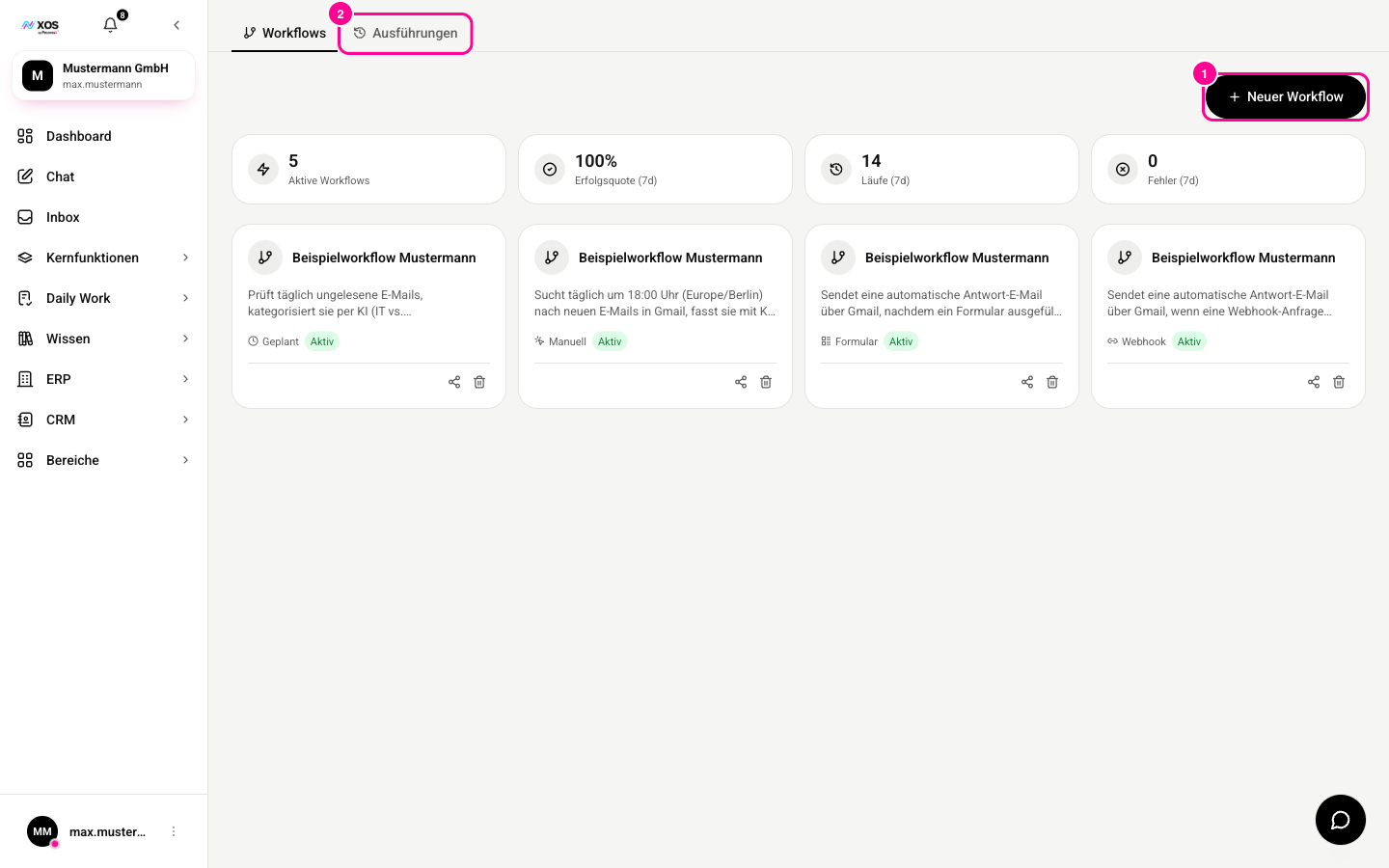
Under Executions (Ausführungen) (marker 2), you see when a workflow ran and whether it had errors.
Besides your own, there are shared workflows (geteilte Workflows) from your organization. If a colleague has already built something suitable, use their workflow as a starting point.
The five triggers
- Manual (Manuell): you start the process yourself with a click.
- Scheduled (Geplant): it runs on a schedule, for example every Monday morning.
- Integration: an event in a connected app kicks off the process. From the Max plan up.
- Form (Formular): XOS creates a public form link. Anyone who fills out the form starts the workflow, even without XOS access.
- Webhook: the workflow gets its own web address that another system can call. From the Max plan up.
Which building blocks are available
- Integration: run an action in a connected app, meaning anything your connectors can do.
- XOS module (XOS-Modul): do something in XOS itself, for example in the CRM or ERP.
- AI block (KI-Baustein): a language model answers once, without tools, for example to summarize or classify a text.
- Agent: unlike the AI block, it may use tools and work across several steps. Use it when the task needs research or access to your systems.
- If, Switch and Filter (Wenn, Weiche und Filter): branch depending on the result of the previous step.
- Set fields, Merge, HTTP request (Felder setzen, Zusammenführen, HTTP-Aufruf): transform data along the way or address an external system directly.