
Plan mode, web & deep research
Go to ChatWhere do I turn on the modes?
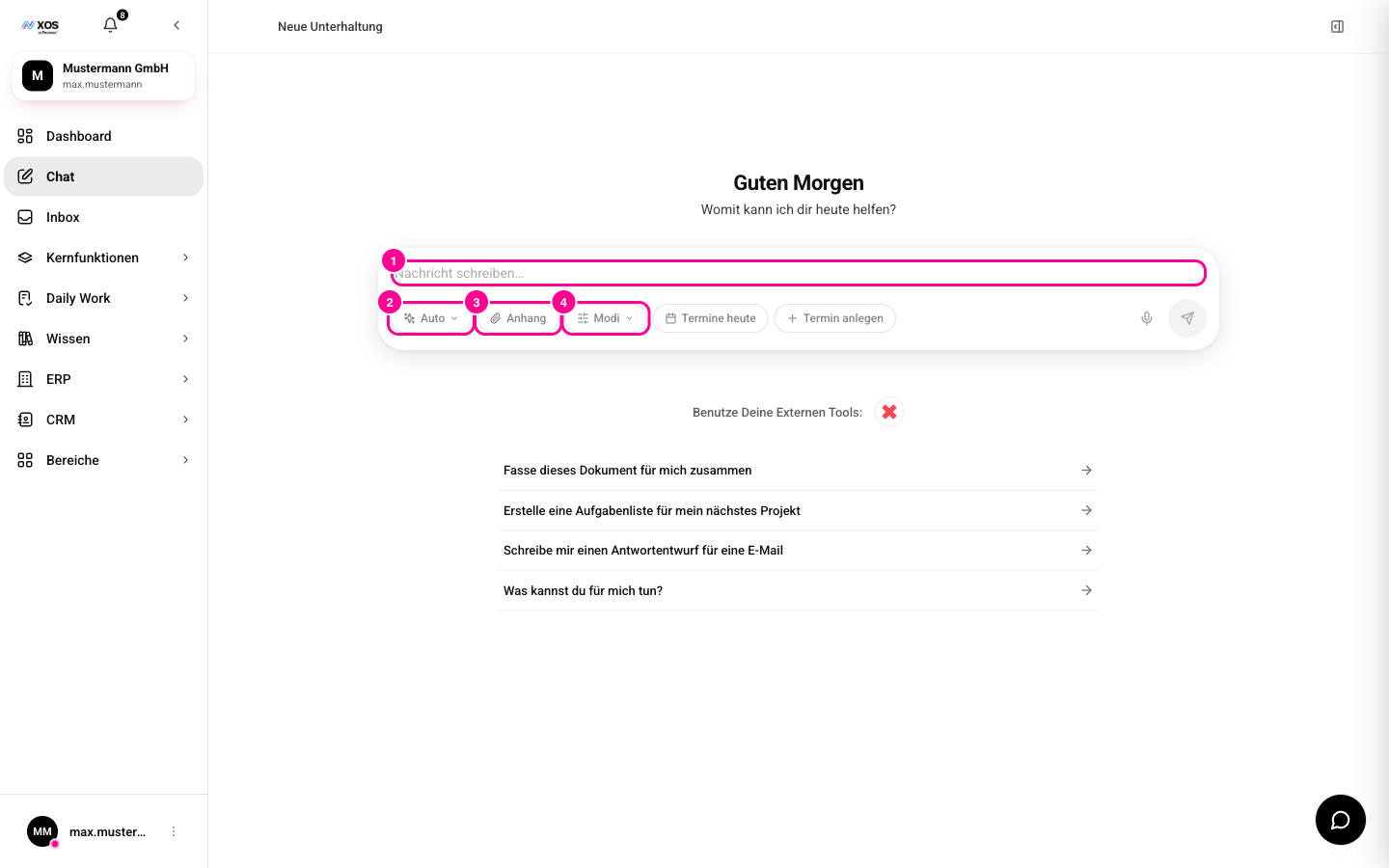
Below the text field in the Chat there is the Modes (Modi) switch (marker 4). It bundles four modes that you can force for your message.
- Click Modes (Modi).
- Choose one or more modes. Active modes are marked with a check mark, and the switch shows how many are on.
- Write your message and send it. A mode stays on until you click it again.
- Plan (Planen): the agent first presents a plan, and you approve it before it is carried out.
- Web Search: a quick web search for this message.
- Deep research (Tiefenrecherche): thorough research across more sources, from the Pro plan.
- Brainstorming: several different ideas instead of one answer.
When do I use Web Search?
With Web Search, the agent searches the web before answering and gives you the sources with title and URL. In the conversation, a card appears, for example web search (Web-Suche) for your query, with the number of results.
Use it for a quick single fact: a current figure, a price, a news item or the latest version of a tool. For questions whose answer doesn't change, you don't need it.
When do I use deep research?
Deep research (Tiefenrecherche) is the more thorough version of web search: the agent searches more sources, pulls more content per source and, if needed, searches several times with different queries. Deep research (Tiefenrecherche) is available from the Pro plan.
At the end it sums up the results in a structured way, points out contradictions between sources and lists the sources it used. In the conversation, a card labeled Deep research (Tiefenrecherche) appears.
How does plan mode work?
For tasks with several steps or consequences, the agent first presents a plan and only carries it out after your approval.
- Under Modes (Modi), turn on Plan (Planen) and write your task.
- A plan card appears above the input field with a title, numbered steps and, optionally, a rationale.
- If everything fits, click Run (Ausführen). The agent carries out the plan right away.
- If you want to change something, click Adjust (Anpassen). Edit the steps (one per line) and click Send (Senden). Cancel (Abbrechen) takes you back to the card.
- If the plan doesn't fit at all, click Discard (Verwerfen). Nothing is carried out.
Which mode when?
- Fast and current: Web Search, when one fact or figure is enough.
- Well-founded overview: deep research, several sources, comparisons.
- Multi-step or consequential task: Plan, approve the plan first, then run it.
- Combination: Plan can be combined with Web Search or deep research. The agent researches and then presents a plan.