
HR Hub
The four HR modules
The HR Hub sits in the sidebar under Areas (Bereiche) and covers your HR work.
- Time Tracking (Zeiterfassung): clock in, clock out and log breaks, keep target and actual hours in view, and request corrections. Team leads see a live board and decide on the requests.
- Employee master data (Mitarbeiterstammdaten): the personnel file with master data, documents, org chart and an overview of expiring contracts.
- Absences (Abwesenheiten): request and approve vacation and other absences, check remaining vacation days, team calendar.
- Applicant management (Bewerbungsmanagement): post jobs, manage applications and their documents, rate them by your own criteria, and create an employee record directly from an application.
How do I clock my time?
In Time Tracking you clock in, take breaks and clock out, and see how your week compares to your target hours.
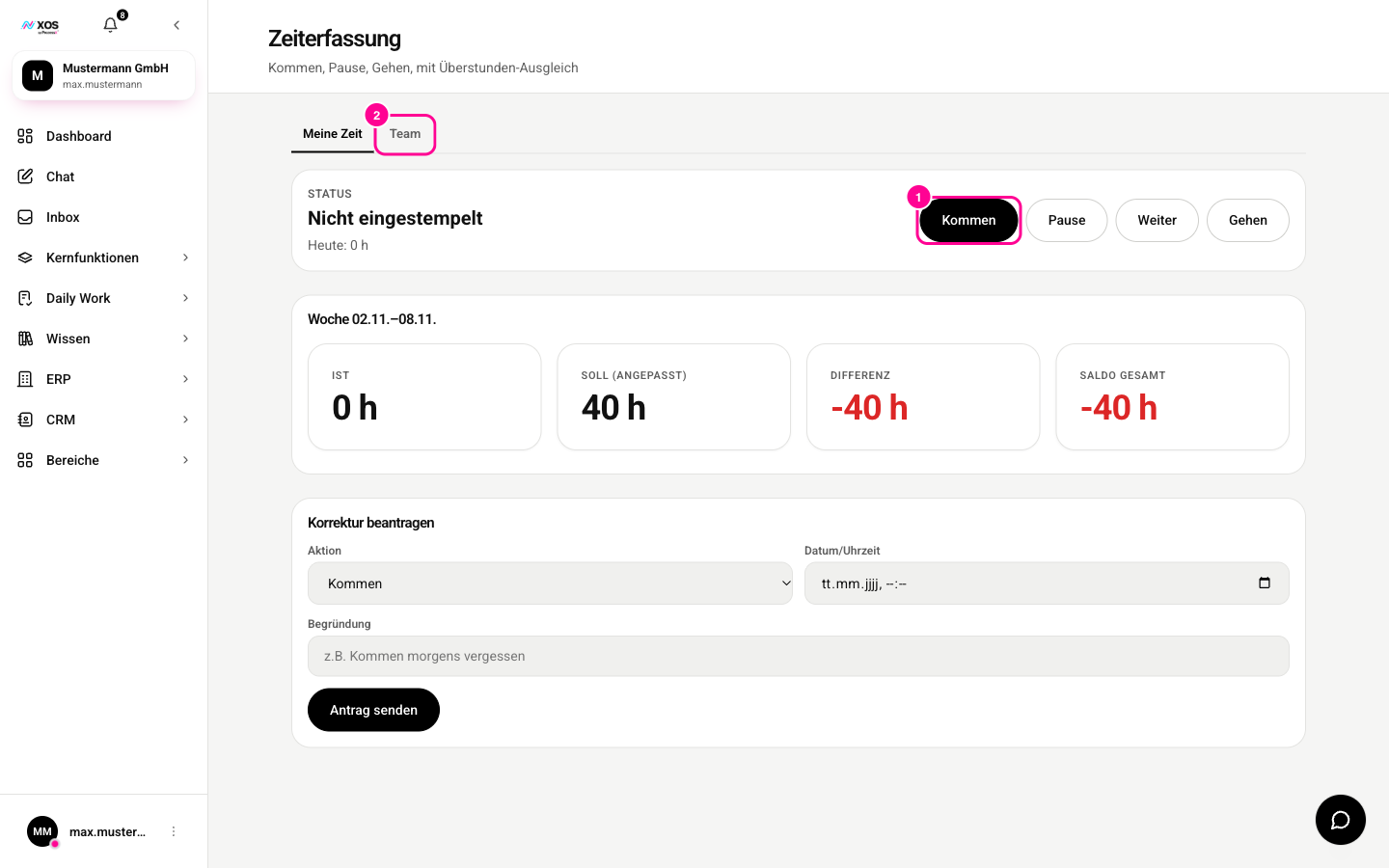
- In the HR Hub, open Time Tracking (Zeiterfassung). The My time (Meine Zeit) tab shows your status.
- Click Clock in (Kommen) (marker 1). After that, Break (Pause), Resume (Weiter) and Clock out (Gehen) are available.
- The weekly overview shows actual, target, difference and total balance.
- Forgot something? Use Request correction (Korrektur beantragen): choose the action, date and time, enter a reason, then click Send request (Antrag senden).
The Team tab (marker 2) is for team leads: there you see the live board and decide on correction requests.
Three things you should know
- Times cannot be rewritten after the fact. Time Tracking secures every entry in a continuous chain, as German principles of proper bookkeeping require. That is why changes always go through a documented correction request.
- Not everyone sees salary, IBAN and tax ID. Anyone without the permission never receives these fields at all. So they are not just hidden, they never leave the server.
- Two legal obligations are built in. Absences alert you to employees who are due for occupational reintegration management (betriebliches Eingliederungsmanagement). Applicant management monitors the deletion deadlines for applicant data, sends reminders and carries out the deletion.
"Attendance" („Anwesenheiten“) appears in the sidebar but is grayed out. The report already exists as a tile on the dashboard, but it does not have its own page yet.