
Knowledge base
Go to the knowledge baseWhat it's for
The knowledge base (sidebar, Core features (Kernfunktionen); the page itself is called Organization knowledge (Organisationswissen)) is your organization's archive: manuals, policies, templates, product documentation, minutes. Everything new colleagues need to know is here in one place.
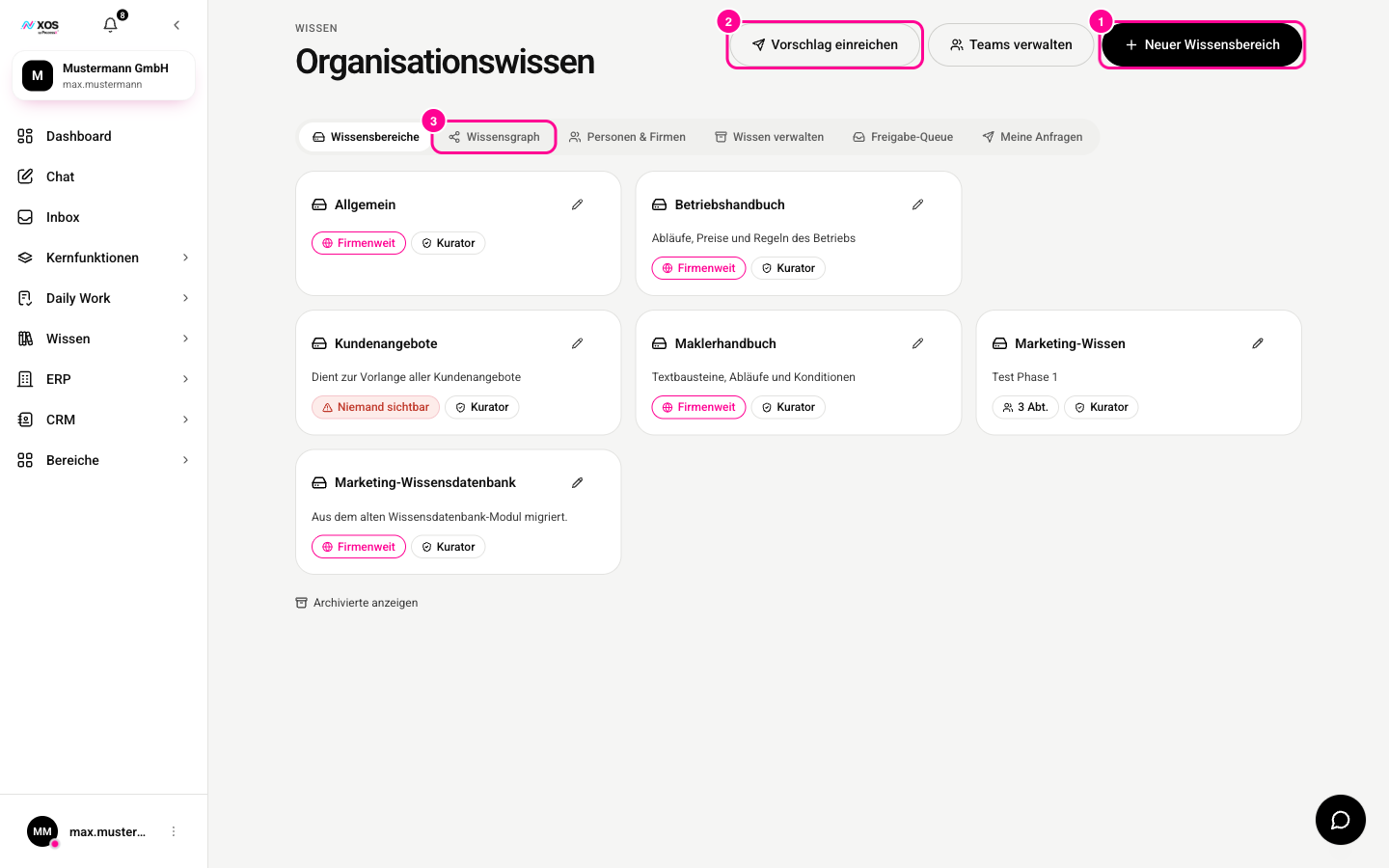
- Marker 1: New knowledge area (Neuer Wissensbereich) creates a new repository (admins only).
- Marker 2: Submit suggestion (Vorschlag einreichen) sends content for approval.
- Marker 3: Knowledge graph (Wissensgraph) shows how the knowledge connects.
The difference from Workplaces: a Workplace is the desk for an ongoing project. The knowledge base is the verified archive, which is why it has an approval step and a Workplace does not.
How do I add something?
Content lives in separate knowledge areas with folders, tailored to roles and departments. You fill them in three ways: upload a file, import from Google Drive or import from Microsoft 365 (OneDrive and SharePoint).
- Click Submit suggestion (Vorschlag einreichen).
- Choose the target knowledge area and the file or import.
- Send the suggestion. A curator approves it, and then it is part of the collection.
Allowed formats are PDF, Word, PowerPoint, Excel, text files, Markdown, CSV, images and videos. A single file can be up to 40 MB.
How does the knowledge get into the chat?
Once content is approved, you don't need to do anything else. XOS automatically searches the knowledge base with every chat message and passes the relevant passages to the model as context. You don't need to pick a document, just ask.
An agent can also suggest adding something from a conversation. It asks you in the chat, and the content still goes through approval afterwards.
How much space do I have?
Storage depends on the seat's plan: 5 GB with Beginner, 10 GB with Pro, 25 GB with Max. The organization's quota is the sum of all seats, even with mixed plans.